
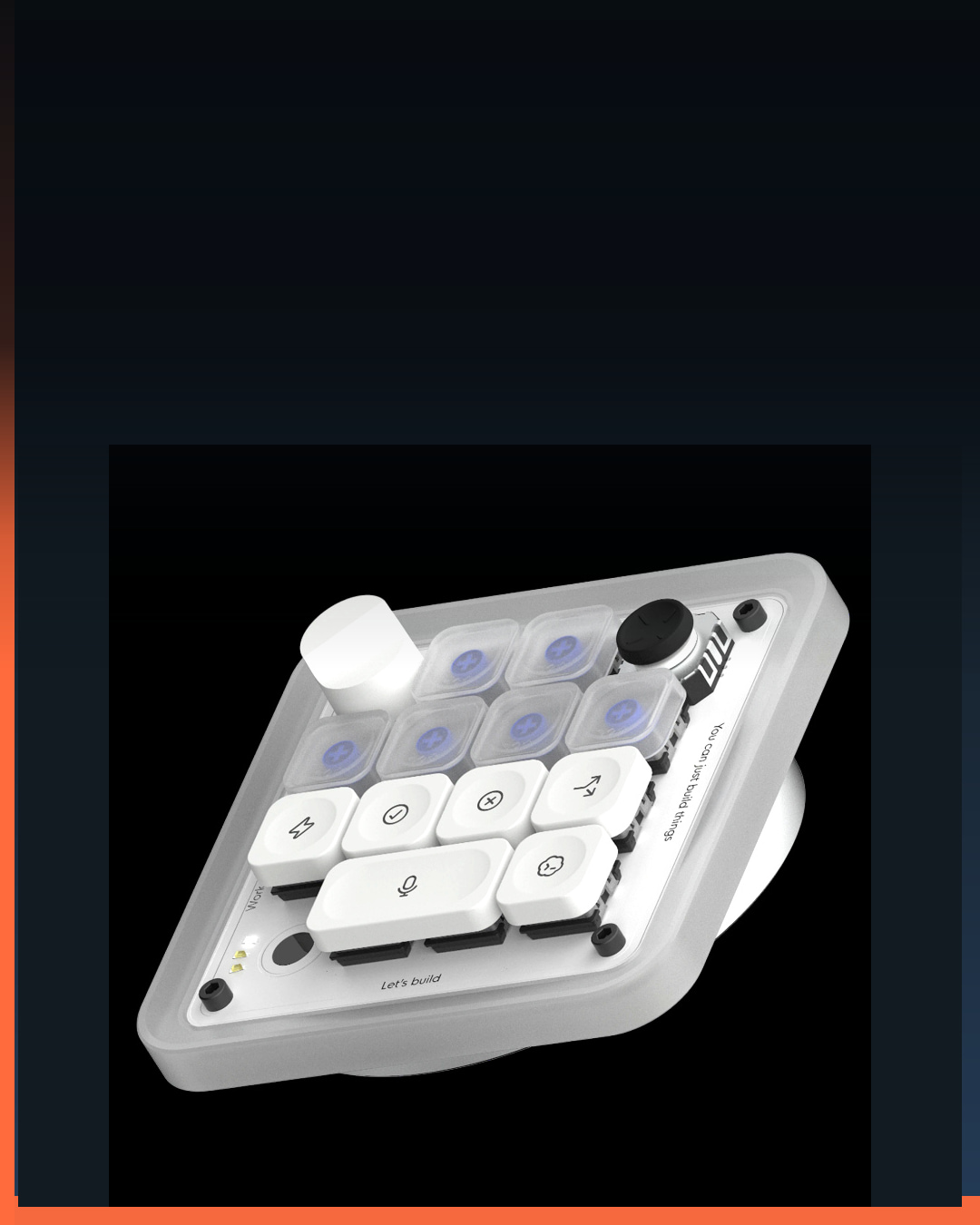
OpenAI-hosted Codex Micro product media in a BTI editorial composition. No OpenAI endorsement or BTI hands-on test is implied.
New AI hardware, plain English
OpenAI Codex Micro Keyboard: What Every Control Does
It is not a computer that runs an AI model. It is a physical control surface for Codex on a Mac or Windows PC.
The OpenAI Codex Micro keyboard turns recurring Codex actions into physical controls. The compact keyboard was designed with Work Louder and connects to a Mac or Windows computer over Bluetooth or USB-C. Its 13 mechanical switches, touch sensor, rotary encoder, planar joystick, and RGB lighting sit beside the computer that actually runs the Codex experience.
The simplest way to understand it is to separate control from compute. Codex Micro can show agent status, launch a mapped workflow, accept or reject a proposed action, start a chat, activate push-to-talk, and adjust a reasoning setting. It does not replace the computer, the ChatGPT Codex software, an account, network access, project files, or human review.
OpenAI calls it a command center for agentic work. That description is useful when read literally: the hardware gives commands and displays status. It is not a new OpenAI model, a standalone AI appliance, or evidence that every coding workflow becomes automatic.
See what unusual AI hardware actually does
Follow @besttechinsight for quick, source-backed breakdowns of new AI hardware, what each control does, and who the product may help.
OpenAI Codex Micro: the quick answer
Codex Micro is a 13-key companion controller for ChatGPT Codex. Agent keys use RGB light to show whether work is thinking, running, waiting, or done. A joystick can trigger workflows such as reviewing a pull request, debugging an error, or refactoring code. Command keys put actions such as accept, reject, push-to-talk, and new chat within reach. A dial changes the reasoning level.
The device connects over Bluetooth or USB-C and supports Mac and Windows. OpenAI lists ChatGPT Codex and Work Louder Input as the software layer. That software connection matters: the colorful keys are not independent agents, and the keyboard does not execute a code change by itself.
What every Codex Micro control actually does
| Control | Official function | In plain English | Important boundary |
|---|---|---|---|
| Agent keys with RGB | Show whether a Codex agent is thinking, running, waiting, or done. | You can glance at the keyboard before switching back to an active chat. | The lights report software status; they do not make an agent faster or more capable. |
| Planar joystick | Launch mapped workflows such as PR review, debugging, or refactoring. | A directional gesture can replace opening a menu for a repeated Codex action. | The exact result depends on the workflow and mapping configured in software. |
| Command keys | Provide shortcuts for actions including accept, reject, push-to-talk, and new chat. | Common decisions and conversation controls get a physical button. | A dedicated key does not remove the need to review an agent’s proposed change. |
| Rotary dial | Adjust the Codex reasoning level. | Turn toward a lighter setting for simple work or a heavier setting for harder work. | More reasoning is not automatically better for every task and can change response time. |
| Touch sensor | Adds a touch-sensitive input to the control surface. | The device can respond to a gesture as well as switches, a dial, and a joystick. | OpenAI’s product page lists the sensor but does not document every default gesture. |
The product page names several example actions, not an exhaustive fixed layout. Work Louder Input and the user’s mappings can affect what a control does.
The colored agent keys are a status board
Agentic software creates a new attention problem. A person may start work in one chat, switch to another file or task, and then wonder whether the first agent is still reasoning, actively running, waiting for input, or finished. OpenAI says each Agent Key can display those states through live RGB feedback.
That turns the keyboard into a glanceable status board. Instead of opening every active conversation just to find the one that needs attention, a user can look for a waiting or completed state. The potential benefit is less context switching, not more model intelligence.
Status colors also need a learning period. A light is useful only when the user knows what it means, trusts that it is current, and maps it to the correct chat or agent. BTI has not independently tested update latency, color accessibility, multi-project behavior, or how the status display behaves when a computer sleeps or disconnects.
The joystick launches a workflow, not a tiny game
OpenAI gives three examples for the planar joystick: reviewing a pull request, debugging an error, and refactoring code. A directional action can therefore act like a shortcut into a repeated multi-step workflow. The practical value depends on whether a person repeats those tasks often enough to remember and benefit from the mapping.
Launching a workflow is not the same as approving its outcome. A review can miss a bug. A refactor can alter behavior. A debugging attempt can target the wrong cause. The physical shortcut reduces navigation; it does not remove the need to inspect context, diffs, test output, permissions, or deployment consequences.
The command keys keep approvals visible
OpenAI names accept, reject, push-to-talk, and new chat as examples of dedicated command-key actions. These are sensible controls because they represent frequent boundaries between the user and the agent: continue with a proposal, decline it, add spoken context, or begin a separate conversation.
A tactile accept key can be faster than finding an on-screen control, but it should not become an automatic approval reflex. The safest mental model is a remote control with deliberate buttons. The user still owns the decision and should understand what will happen before accepting a consequential operation.
The dial changes how much reasoning to request
OpenAI says the rotary dial adjusts reasoning level in the moment. A lighter setting can suit a simple transformation or routine question, while a heavier setting can suit a difficult architectural decision, multi-file investigation, or ambiguous bug. The dial makes that choice physical and reversible.
More reasoning should not be treated as a quality score. A straightforward task may not benefit from a heavier setting, and a difficult task can still need better context, clearer requirements, tools, tests, and human judgment. The control changes a request to the software; it does not guarantee correctness.
Codex Micro hardware at a glance
| Part | OpenAI lists | Why it matters |
|---|---|---|
| Connection | Bluetooth and USB-C | It can work wirelessly or through a cable, subject to software setup and host-device support. |
| Compatibility | Mac and Windows | The controller is designed for desktop Codex workflows rather than standalone use. |
| Inputs | 13 mechanical switches, one touch sensor, one rotary encoder, one planar joystick | Different physical actions can map to statuses, commands, workflows, and settings. |
| Lighting | RGB | Agent state can be shown without opening every active chat. |
| Materials | CNC polycarbonate and aluminum, PBT and PC keycaps | The product uses keyboard-grade materials rather than a touchscreen-only interface. |
| Software | ChatGPT Codex and Work Louder Input | The hardware depends on a software layer for its mappings and live status. |
| Included | Creator Micro, USB-C cable, Codex icon keyset | OpenAI lists the controller, connection cable, and alternate icon caps as the package contents. |
Who would use it, and who can skip it?
Codex Micro makes the most sense for someone who already uses Codex repeatedly, keeps more than one agent task active, and performs the same review, debug, refactor, chat, or approval actions often enough that physical controls save attention. The RGB status feature is more distinctive than a normal macro pad because it can reflect live agent state.
A person who uses Codex occasionally can keep using the normal software interface. A standard keyboard shortcut, existing macro pad, stream deck, or mouse may already cover some command-launching needs. The value is therefore not simply the number of buttons. It is the integration among status feedback, Codex actions, and a compact physical layout.
BTI has not operated the device and cannot assess switch feel, wireless reliability, configuration depth, accessibility, software stability, repairability, long-term support, or daily time saved. OpenAI’s listing is the source for the functions and specifications in this guide.
How BTI checked the Codex Micro claims
BTI reviewed OpenAI’s official Codex Micro product page on July 16, 2026. The page supplied the product name, Work Louder collaboration, live RGB agent states, joystick workflow examples, command-key examples, reasoning-dial description, Mac and Windows compatibility, Bluetooth and USB-C connections, material list, hardware counts, software names, and included items.
BTI translated those listed functions into beginner-friendly descriptions while keeping control, compute, configuration, and approval boundaries visible. When OpenAI named example workflows rather than a complete default mapping, BTI described them as examples. When the page listed a touch sensor without every gesture, BTI did not invent one.
A bounded public competitor sample also found same-day Codex Micro posts from CNET and Interesting Engineering. Neither post exceeded the strong Tornyol Reel signal in that sample, so Codex Micro remains behind Tornyol in BTI’s publishing queue. Their public likes and comments are directional packaging evidence only and do not reveal reach, retention, saves, shares, follows, watch time, causation, or virality. BTI did not copy competitor wording, media, edits, or music.
This article contains no affiliate link because BTI has not verified an affiliate program for the official listing. Live price and stock can change, so readers should check OpenAI’s current product page rather than rely on a static claim here.
What the product page does not establish
- That Codex Micro runs a model, stores a project, or works without a connected computer and software.
- How much time the controller saves, how quickly status lights update, or whether every workflow is configurable.
- Switch feel, battery behavior, wireless range, accessibility, durability, repairability, or long-term software support.
- A permanent price, current stock status, shipping date, regional availability, resale value, or affiliate offer.
- Any BTI hands-on test, benchmark, review score, product rating, award, endorsement, or recommendation to buy.
What to remember
Codex Micro is a controller, not the computer or the model. Its most useful idea is making agent work glanceable: colored keys can show which task is thinking, running, waiting, or done. The joystick and command keys shorten repeated actions, while the dial changes the requested reasoning level.
The real buying question is whether those physical controls reduce enough switching in your existing Codex workflow to matter. If the software interface already feels fast, the controller is optional. If several agent tasks regularly compete for attention, live status plus tactile actions may be the more interesting combination.
Follow @besttechinsight for the next exact AI product, model, chip, robot, or science demonstration decoded without the jargon. Related BTI guides explain which OpenAI GPT-5.6 model fits which task, why inference chips differ from training chips, and which parts of Tornyol’s moth test ran onboard and offboard.
OpenAI Codex Micro keyboard FAQ
Does Codex Micro run AI by itself?
No. OpenAI describes it as a control surface for ChatGPT Codex on Mac or Windows. It depends on connected software and a host computer.
What do the colored keys mean?
OpenAI says Agent Keys can show whether a Codex agent is thinking, running, waiting, or done through live RGB feedback.
What does the Codex Micro joystick do?
It can launch mapped Codex workflows. OpenAI gives reviewing a pull request, debugging an error, and refactoring code as examples.
What does the reasoning dial change?
OpenAI says the rotary dial adjusts reasoning level, allowing a user to request a lighter setting for simple work or a heavier setting for harder work.
Does Codex Micro work on Mac and Windows?
OpenAI lists both Mac and Windows compatibility, with Bluetooth and USB-C connection options. Check the current product page and software requirements before relying on a specific setup.
Did BTI review Codex Micro?
No. This is a source-backed product explainer based on OpenAI’s official listing, not a hands-on review, benchmark, rating, or buying recommendation.
Sources
- OpenAI Supply Co.: Codex Micro: Primary source for the product name, controls, agent-status lights, workflows, compatibility, materials, included items, and hardware specifications.
- CNET Instagram: Codex Micro carousel: Public competitor-format evidence used only to assess whether a literal product-first visual and control map are timely.
- Interesting Engineering Instagram: Codex Micro image: A second public packaging reference; BTI did not reuse its wording, image, edit, or engagement claims.